
It's 4 p.m. on Friday. The document review queue is growing, a production deadline is getting uncomfortably close, and the phone is ringing somewhere near the reception desk. Nobody answers it. The firm has litigation software, a document-management system, and several intelligent people who are now doing work that could have been assigned days ago.
That isn't a software failure. It's a capacity failure.
Litigation support services work best when technology, trained people, and documented workflows operate together. The right support structure protects evidence, moves discovery forward, keeps case files usable, and prevents attorneys from becoming the firm's default data-entry team. It also starts before a matter reaches discovery, with intake and follow-up that determine whether the firm signs the case at all.
Table of Contents
- Beyond the Software, The Reality of Litigation Support
- Core Tasks That Drive Case Success
- The Hidden Cost of Slow Lead Response
- Managing Discovery Economics and Attorney Time
- Evaluating and Engaging a Support Partner
- Building Capacity for Sustainable Growth
Beyond the Software, The Reality of Litigation Support
Litigation support is often reduced to e-discovery platforms, trial presentation tools, or document databases. Those tools matter, but a license doesn't preserve a custodian's mailbox, interview a witness, resolve a duplicate, review a privilege call, or notice that a production set contains the wrong version of a file. People still do those things. Usually under pressure.
The American Bar Association's 2022 Litigation Technology and E-Discovery Survey found that access to litigation-support software varied by firm size. 21% of solo-attorney respondents reported access, compared with 31% of firms with 2–9 attorneys, 54% of firms with 10–49 attorneys, and 75% of firms with 100 or more attorneys. The survey also showed that firms used these systems for much more than courtroom presentation. Document review, Bates stamping, full-text search, OCR, redaction, production generation, and annotation all appeared among the principal functions.
People determine whether the system works
A useful platform can index files quickly. It can't decide whether the collection scope is defensible or whether a potentially privileged communication needs attorney review. It can't chase a missing acknowledgment or explain why a custodian's mobile data wasn't included.
That's why a serious litigation-support model combines:
- Trained personnel: Someone owns preservation, collection, review coordination, production checks, and exception handling.
- Documented workflows: The firm records decisions, deadlines, custodians, systems, approvals, and unresolved gaps.
- Appropriate technology: The team uses search, filtering, deduplication, OCR, review coding, redaction, and production tools for a defined purpose.
Practical rule: Evaluate support providers by the decisions they help your team make and document, not by the number of features displayed during a demo.
The same principle applies to growth work around the case. Marketing may generate demand, but operational teams must absorb it. Resources such as how Olivetree Marketing drives growth can help firms think about acquisition, but a growth plan becomes expensive decoration if no one answers, qualifies, follows up, and opens the file.
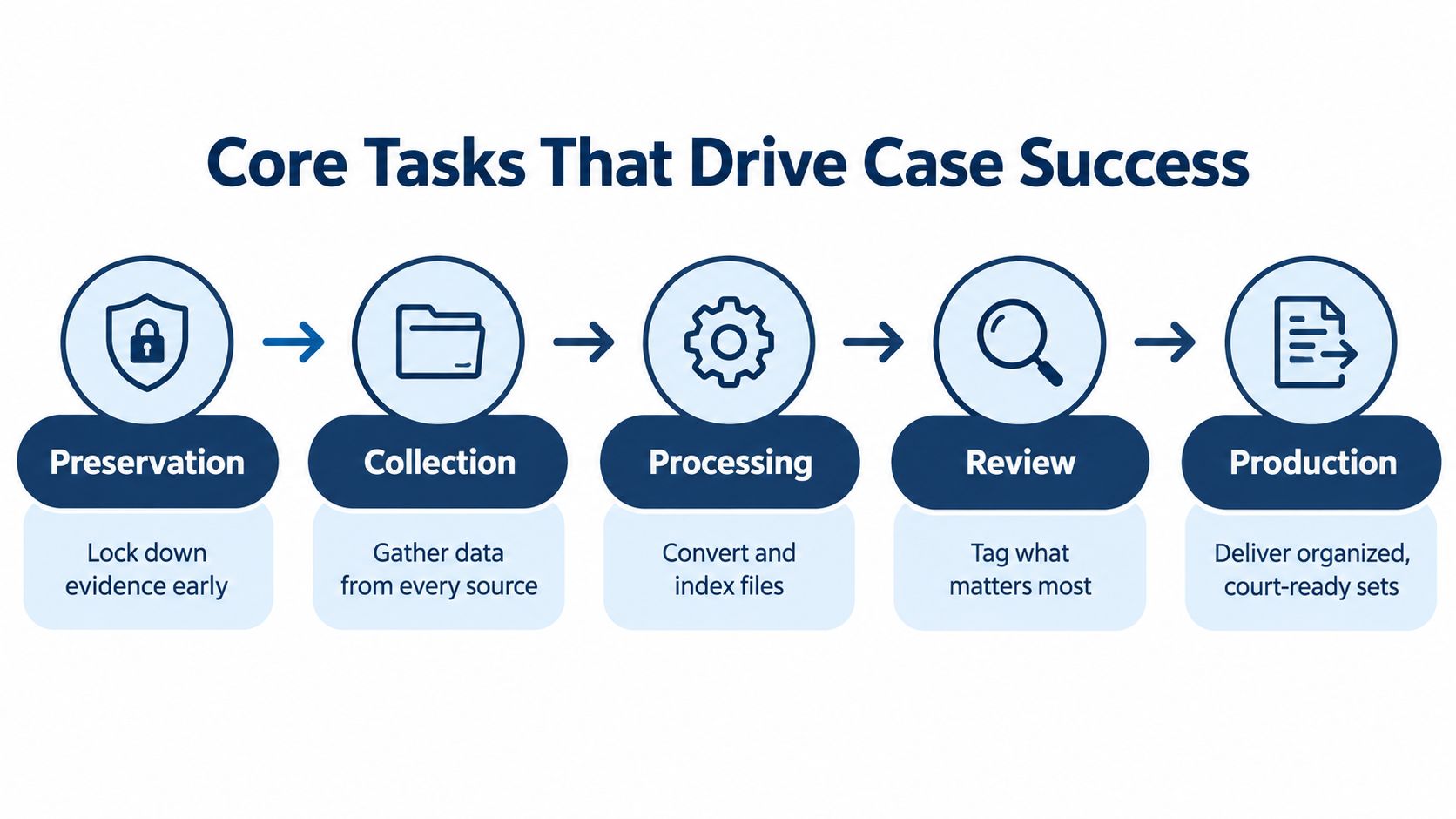
Core Tasks That Drive Case Success
A matter usually becomes difficult long before the review platform fills with documents. The first failure often occurs when nobody clearly identifies what must be preserved, who controls it, or which systems contain it.
Preservation comes before collection
The Sedona Conference's primer on managing electronic discovery in small cases emphasizes early identification of likely custodians and relevant electronically stored information, using reasonable, good-faith, and proportionate efforts. In practice, support personnel help document when the hold was triggered, interview custodians, list covered devices and systems, issue acknowledgments, monitor compliance, and record exceptions.
A legal hold preserves potentially relevant information. Collection transfers a defensible subset for processing and review. Treating those steps as interchangeable creates confusion at exactly the point where the firm needs a clean record of what happened.
The workflow continues through production
Once the scope is set, the team gathers email, messaging data, cloud files, mobile content, shared-drive material, and paper records where relevant. Processing then converts and indexes files, identifies duplicates, applies documented filters, and prepares the population for review.
Review requires more than marking documents relevant or irrelevant. The team must separate privileged and confidential material, apply consistent coding rules, escalate uncertain calls, and retain an audit trail. Redaction must be checked, not merely applied. Production then requires Bates stamping, load-file validation, naming consistency, and a final quality-control review.
A provider with investigative capability may also support fact development outside ordinary document workflows. For example, Private investigator services can be relevant when a matter requires background research, locating individuals, or gathering information that complements the formal discovery process.
Here's the operational test: can someone else understand what was collected, excluded, reviewed, withheld, redacted, and produced without relying on one exhausted employee's memory? If not, the firm has activity, not control.
The Hidden Cost of Slow Lead Response
A firm can execute discovery perfectly and still lose the matter before a file exists. The first operational question is not whether the review team can process evidence. It's whether anyone responds while the prospective client is still choosing counsel.
A 2025 mystery-shopper study found that 25% of tested U.S. firms responded within five minutes, 33% within ten minutes, and 56% within one hour. 39% took more than two hours to respond or did not respond at all. A separate 2022 study of 967 U.S. law firms found that when a firm failed to respond within fifteen minutes, it was unlikely to respond during the study's seven-day observation period.
That isn't a minor intake inconvenience. It's a process with no owner.
Taking a message isn't intake
An answering service can record a name and number. Intake requires qualification, accurate matter information, conflict-check preparation, appointment setting, appropriate routing, and follow-up when the prospect doesn't sign immediately.
The 2024 response-time benchmark reported a median response time of 13 minutes, with 28% of firms responding within five minutes, 35% within ten minutes, and 56% within two hours. The methodology counted first personal outreach, not an automated acknowledgment. That distinction matters. An email saying “we received your inquiry” is not a conversation.
Use a simple intake audit:
- Measure the clock: Record the exact time from form submission or missed call to first personal outreach.
- Assign ownership: Every lead needs a named person or team, including nights, weekends, and overflow.
- Track dispositions: Record whether the lead was reached, qualified, scheduled, signed, declined, or still pending.
- Keep following up: A single unanswered call is not a system. It's an optimistic guess.
A structured inside sales lead generation playbook can help firms design follow-up discipline, but the process still needs trained people and clear accountability. Firms evaluating their own response performance can also review why fast lead response matters.
More marketing won't repair an intake queue that nobody monitors. Your CRM cannot follow up with a lead if nobody puts the lead in the CRM.
Managing Discovery Economics and Attorney Time
Discovery costs expand when the firm collects broadly without a defensible reduction strategy. A RAND Institute estimate cited by the American Bar Association reports that privilege and responsiveness review averaged approximately $0.73 of every dollar spent on e-discovery, while a typical civil matter may contain 3–5 GB of potentially responsive ESI per employee. Those figures appear in Mayer Brown's discussion of e-discovery in employment litigation.
The sequence is predictable. Broad collection creates a larger review population. A larger population requires more attorney hours, privilege screening, quality-control sampling, and deadline management. The firm then pays for the consequences of weak scoping before anyone has made a substantive strategic decision.
Reduce data before lawyers review it
Support teams can map custodians and data sources, deduplicate, apply documented search terms or technology-assisted review, separate privileged and confidential material, and test recall and precision through sampling. The objective isn't to eliminate judgment. It's to reserve attorney judgment for the documents and decisions that require it.
A defensible workflow records:
- Collection scope: Which custodians, devices, accounts, and repositories were included.
- Processing settings: How files were extracted, indexed, normalized, or excluded.
- Reduction logic: Which filters, search terms, date ranges, and deduplication rules were used.
- Review controls: How coding decisions, privilege calls, exceptions, and quality checks were handled.
- Production validation: How Bates ranges, redactions, load files, and document counts were checked.
The staffing side deserves equal attention. A summary citing the American Bar Association's 2023 Legal Technology Survey reports that attorneys spend between 30% and 48% of their work hours on non-billable administrative tasks. The range doesn't describe every practice, but it makes one point hard to ignore: case administration is consuming capacity that firms often assume they can absorb indefinitely.
That's where document management for law firms becomes an operating discipline rather than a software category. A system helps, but someone must organize files, request records, maintain matter data, monitor deadlines, and escalate missing information.
The cheapest document to review is the one a trained team can defensibly exclude before an attorney opens it.
Technology reduces repetitive handling. Dedicated support staff make sure the technology is used consistently, exceptions reach the right person, and the work doesn't return to the partner's desk wearing a different hat.
Evaluating and Engaging a Support Partner
Start with the work, not the vendor's feature list. Write down the tasks that are late, duplicated, undocumented, or routinely pushed onto attorneys. Then ask each provider to explain exactly who owns those tasks, what the handoffs look like, and how performance is reviewed.
Check the operating model
A shared resource may be efficient for occasional overflow, but it can also create context switching and inconsistent matter knowledge. A dedicated, full-time professional working inside one firm's systems can learn the firm's naming conventions, intake rules, case-management platform, and escalation preferences. The trade-off is that dedicated capacity requires clearer role design. That's a useful constraint, not a flaw.
Ask prospective partners:
- Who performs the work: Dedicated staff, rotating contractors, software, or a mixture?
- Who reviews decisions: Especially privilege, relevance, redaction, and production exceptions.
- How is quality measured: Look for error logs, sampling, turnaround tracking, unresolved gaps, and documented corrective action.
- How does onboarding work: The provider should learn your workflows, not just hand you a login.
- Can the team support your practice: Personal injury and mass tort firms may need records, bills, liens, demands, pleadings, discovery, and CRM updates handled in a connected process.
A co-managed model is usually more practical than a blind handoff. The firm keeps control over legal judgment while the support partner owns defined operational work and reports on it. Firms comparing that structure with other options can review virtual staffing solutions as part of their evaluation.
Building Capacity for Sustainable Growth
Litigation support services create value when they remove friction across the whole matter lifecycle. Preservation and discovery controls protect the case. Records, file management, and administrative support keep work moving. Intake and follow-up determine whether new opportunities become signed matters instead of unanswered notifications.
The common mistake is to solve each problem separately. A firm buys a review platform but has no one to administer it. It invests in marketing but leaves inquiries in a shared inbox. It hires an attorney to handle growth, then gives that attorney records requests, calendar maintenance, CRM cleanup, and production logistics. The firm has added cost without adding enough usable capacity.
Build roles around recurring work
A stronger approach maps the work that repeats and assigns it to people trained for that work. Staffline, for example, provides dedicated full-time legal support professionals assigned to one firm, working inside its systems and learning its procedures. Possible roles include case management, records and bill retrieval, lien reduction, file opening, calendar and inbox management, CRM hygiene, intake, and administrative support.
Frontline addresses a different point of failure. It provides 24/7 live intake, including nights and weekends, with qualification, structured follow-up, call-quality review, and English and Español coverage. It isn't just an answering service. Taking a message is not intake, particularly when the prospect is contacting several firms.
The operational model should also accommodate AI-assisted discovery without pretending that automation removes responsibility. The Everlaw Innovation Report 2025 reported that 37% of surveyed legal professionals were using generative AI in 2025, while 56% were planning or considering future use. The same report found that only 3% of firms conducted e-discovery skills assessments, 25% had AI-use policies under development, and 70% identified data security and privacy as a major concern.
That gap points to the core requirement: trained people, validation rules, audit trails, privilege controls, and someone accountable for the final decision.

A practical capacity review can begin with four questions:
- Which recurring tasks are attorneys performing because nobody else owns them?
- Where do matters wait for a follow-up, record, approval, or status update?
- Which leads arrive outside business hours or receive inconsistent outreach?
- Which workflows depend on one person remembering what to do next?
The answers usually reveal that the firm doesn't need more activity. It needs clearer ownership and reliable capacity. Frontline signs the case. Staffline carries it. When those roles connect to documented workflows, technology becomes useful instead of becoming another subscription everyone avoids discussing at budget meetings.
Attorney Assistant provides dedicated legal support staff through Staffline and 24/7 live intake through Frontline, with support for intake, follow-up, case administration, records, liens, discovery, and other operational work. Visit Attorney Assistant to assess where your firm is losing attorney time, case capacity, or prospective matters, then identify the support structure that fits those gaps.
Related Articles

Preferred Method of Contact for Law Firm Intake
Discover how to capture and use the preferred method of contact in legal intake to improve conversions, ensure compliance, and streamline law firm operations.

White Glove Support for Law Firms
Discover how white glove support transforms law firm intake and operations. Learn the metrics, staffing models, and workflows that actually sign cases.

How to Call Answer Phone for Your Law Firm
Learn how to call answer phone professionally at your law firm. A practical guide to building 24/7 intake, scripting, and follow-up that signs cases.